AI coding output is up 59%. Shipping is down 7%. Here's the missing piece.
Everyone knows AI will transform software delivery; few get there. A CTO's view on why tool integration, not model capability, is the real bottleneck.
There's a stat that should worry every engineering leader: CircleCI's 2026 Software Delivery Report — analyzing 28 million CI/CD workflows across thousands of teams — found that development activity rose 59% in 2025 while median main-branch throughput fell 7%. More code entered pipelines, fewer features shipped to production. That's not a productivity gain — it's a productivity illusion.
Meanwhile, the narrative in every boardroom is the same: "AI will transform how we build software. We need a strategy." And most strategies look like this: buy GitHub Copilot licenses, tell developers to use ChatGPT, wait for results.
I've been running engineering teams for over a decade. What I see right now is a widening gap between companies that talk about AI transformation and companies that ship with it. The difference isn't which model they use. It's whether their AI can actually touch the systems where work happens.
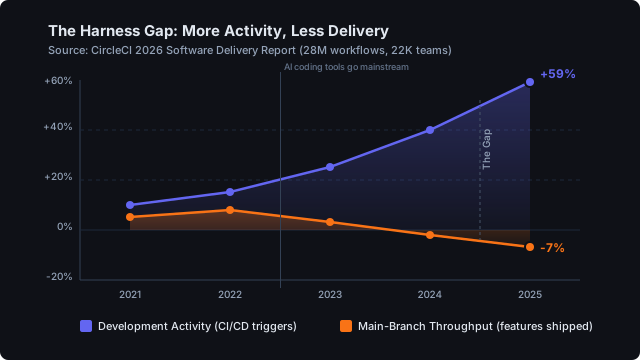
The productivity paradox: more output, less delivery
Why would more AI-generated code lead to less shipping? Because code is not the bottleneck. It never was.
Software delivery is a chain: understand the problem → gather context → design a solution → implement → verify → deploy → validate with users. Code generation helps with exactly one link in that chain.
The expensive parts — the parts that determine whether your team ships in days or weeks — are everything around the code:
- Context gathering. Reading through 30 Jira tickets to understand the scope. Searching Slack for the decision that was made three weeks ago. Finding the Figma mockup that was approved. As Hugo Zanini puts it: "Developers spend a lot of time context-switching between their IDE, data catalogs, docs, and metadata tools."
- Cross-system coordination. Updating Jira status. Posting in the right Slack channel. Creating the merge request with the right labels. Linking the MR to the ticket.
- Verification. Checking the CI pipeline. Reviewing the deployment. Validating against the original requirements in Notion.
- Communication. Summarizing what was done. Notifying stakeholders. Updating the sprint board.
McKinsey's research confirms that AI can cut coding task time in half — but only for the coding part. And an AI that can write code but can't read your Jira tickets, check your pipelines, or post in your Slack channels is solving maybe 20% of the problem. The other 80% — the coordination overhead that consumes most of your team's time — remains untouched. The CircleCI data makes this brutally clear: speed of generation and speed of delivery are not the same thing.
What changes when AI can touch your systems
Give a senior developer an AI agent with authenticated access to Jira, GitLab, Slack, Google Workspace, Notion, Figma, Grafana, and your analytics tools. Not just “can generate code” — but can read tickets, check pipelines, post updates, create merge requests, query dashboards. Research on context switching shows interrupted developers take 10–15 minutes to refocus and produce twice as many errors — so the win is not measured in lines of code generated, it’s measured in interruptions removed.
What happens:
- Context building collapses. “Summarize the last 5 tickets on this epic and the Slack discussion in #product-decisions” takes 10 seconds instead of 30 minutes.
- Coordination becomes automatic. The AI creates the MR, links it to the Jira ticket, transitions the status, and posts a summary in Slack — in one prompt, not four manual steps across four tabs.
- Verification accelerates. “Is the pipeline green? Does the diff match what the ticket asked for? Are there any Sentry errors after deploy?” — all checkable without opening a browser.
Ben Newton calls this "Mission-Command Development" — a model where one senior engineer directs AI agents across the delivery chain, handling work that traditionally required multiple specialists. His argument: the leverage doesn't come from better code generation, but from eliminating coordination overhead between systems.
The real shift: expanding competence left and right
Here's what I see happening in teams that have figured this out. It's not about replacing developers. It's about expanding what one developer can do.
In a traditional setup, delivering a feature from insight to production involves:
- Product Manager — writes the spec, gathers requirements from stakeholders
- Designer — creates mockups in Figma, iterates with PM
- Backend Developer — builds the API, writes migrations
- Frontend Developer — implements the UI from Figma specs
- QA Engineer — writes tests, verifies against acceptance criteria
- DevOps — configures CI/CD, manages deployment
- Project Manager — coordinates all of the above, updates Jira, reports status
That's 7 people for one feature. With handoffs, meetings, and waiting time between each step.
Now picture a developer with AI tool access across all these systems:
- Insight — queries analytics (Amplitude, Metabase) and user feedback (Jira, Notion) to understand the problem space
- Context — reads existing code, API docs, Figma mockups, and past decisions from Slack
- Prototype — builds a working prototype using existing web interfaces as a reference, deploys to a preview environment
- Integration — extends the backend, connects to existing services, writes tests
- Validation — deploys to a branch-based environment, runs E2E tests, shares with stakeholders for feedback
- Delivery — merges, deploys to production, updates Jira, posts the summary in Slack
Same lifecycle. But one person driving it, with AI handling the cross-system orchestration. This is still an emerging pattern, not a proven playbook — but early practitioners are showing what's possible. Ben Newton, a senior engineer with 25+ years of enterprise experience, reports shipping three complete products solo using this model — work that would normally require full teams.
The implication isn't that you fire 6 people. It's that your team of 7 could run 7 parallel tracks instead of one sequential pipeline. That's not a 10% improvement — it's a fundamentally different throughput model.
Why "just use ChatGPT" doesn't get you there
Most AI strategies fail at the implementation layer. The board approves an AI initiative. The CTO buys licenses. Developers paste code into ChatGPT. And then... nothing changes structurally.
The reason is simple: ChatGPT and Claude are disconnected from your systems by default. They can reason about your code if you paste it in. They can draft a Jira ticket description. But they can't create the ticket, check the pipeline, or post in Slack. As Phinter Atienoo writes in Syncfusion: the shift is from AI as a coding tool to AI as an orchestration layer — but most organizations haven't made that leap yet.
The gap between "AI can help me think" and "AI can help me do" is tool integration. And that gap is exactly where the 59%-up-7%-down paradox lives. More thinking assistance, no execution assistance.
Closing that gap requires three things:
- Authenticated access — the AI needs to act as you, with your permissions, in your Jira, your Slack, your GitLab. Not a shared bot account — per-user identity.
- Policy control — you need guardrails. The AI should be able to create a Jira ticket but maybe not delete a production branch. CircleCI's data shows that teams without proper harnesses — missing context, constraints, and validation — actually ship less because they spend more time recovering from failures (recovery time up 13% year-over-year, now averaging 72 minutes per incident).
- Cross-system orchestration — the AI needs to chain actions across tools in a single workflow. "Merge the MR and update the ticket" is one operation, not two separate prompts.
What this looks like in practice
Here's a real workflow from our team. One prompt, five systems:
"Look at the open merge requests in our main repo, find the one for issue #642, check if the pipeline passed, merge it if green, close the Jira ticket with a summary of what was fixed, and post the update in #dev-updates."
The AI agent (Claude, in our case) does this in about 15 seconds:
- Queries GitLab for open MRs → finds the right one
- Checks the CI pipeline → green
- Merges the MR
- Closes the linked Jira ticket with a formatted comment
- Posts a summary in Slack
Without tool integration, this same sequence takes a developer 5-10 minutes of tab-switching and manual data transfer — and research shows each interruption costs another 10-15 minutes to regain focus. Even a conservative estimate — 10 such cross-system tasks per day, 5 minutes each, across a team of 10 — adds up to over 40 hours per week of coordination work that tool integration can dramatically reduce.
This is how you close the Harness Gap. Not by generating more code — by eliminating the friction between systems.
The competitive window is now
Right now, most companies are in the "buy Copilot licenses" phase. A few are experimenting with AI agents. Almost none have systematic tool integration with policy control. The data is sobering: only about 5% of enterprise AI systems actually reach production (MIT, 2025), and Gartner estimates that 40% of agentic AI projects will be scrapped by 2027.
The reason most pilots stall? They hit multi-step workflows where accuracy compounds against them — at 85% accuracy per step, a 10-step workflow succeeds only 20% of the time. The fix isn't better models. It's constraining scope and connecting systems — giving AI bounded, authenticated access to real tools instead of asking it to do everything from a blank prompt.
That means there's a window — maybe 12 to 18 months — where teams that figure out AI tool integration will have a structural advantage. Not just "we code faster" but "we deliver features with 3 people that used to take 10." That's not incremental improvement. That's a different cost structure.
The companies that will struggle are the ones that treat AI as a coding tool instead of an operating system for their engineering workflow. The winners will look more like special forces than assembly lines — small, highly capable teams where each person has AI amplifying their reach across the entire delivery chain.
How to start
For a CTO or engineering leader reading this: pick one workflow that crosses 3+ systems (the canonical one is Jira ticket → GitLab MR → Slack notification) and run it end-to-end with a gateway in front. Use per-user OAuth so every action is traceable to a person, not a shared service account. Policy hooks block destructive actions before they execute. MCP works today across Claude, ChatGPT, Gemini, Cursor, Replit, and Zed. Self-hosted gateways like mcpgate connect Jira, GitLab, Slack, Google Workspace, Notion and the rest of the work stack through one endpoint. The infrastructure is there.
The question is whether your organization will be one of the few that ships with it — or one of the many that's still talking about it 18 months from now.
Ready to close the gap?
mcpgate connects Claude, ChatGPT, and Gemini to your work tools — Jira, GitLab, Slack, Google Workspace, Notion, Microsoft 365 and the rest of your daily stack — through a single MCP endpoint. Per-user OAuth, policy guardrails, and full audit logging included.
Try the live demo — no signup required. Or read the docs to set up your own instance.
Frequently asked questions
How much does MCP implementation cost?
MCP itself is an open protocol — there's no licensing fee. The cost depends on your integration approach: self-hosted gateways like mcpgate start with a free tier for evaluation and scale to enterprise plans. The real investment is in configuring your service connections (OAuth setup per tool) and defining policy guardrails. Most teams get a first workflow running in under a day.
What's the learning curve for engineering teams?
If your developers already use AI coding tools (Copilot, Claude, ChatGPT), the step to tool-integrated AI is small. MCP works through the same interfaces they already know — the difference is that prompts can now reach into Jira, GitLab, Slack, etc. The bigger learning curve is organizational: defining which actions AI should be allowed to take autonomously vs. which need human approval.
Which tools should we integrate first?
Start with the tools involved in your most repetitive cross-system workflow. For most teams, that's the issue tracker → code repository → CI/CD → team communication chain (e.g., Jira → GitLab → Slack). This single chain covers ticket management, merge requests, pipeline checks, and status updates — the workflow where developers lose the most time to tab-switching.
Does AI tool integration replace developers?
No. It amplifies them. The pattern we see is not fewer developers, but developers handling broader scope. Instead of one feature requiring handoffs between 5-7 specialists, one developer with AI tool access can drive the entire lifecycle — freeing the rest of the team to work in parallel on other features.
Further reading
On the productivity paradox
- CircleCI's 2026 Software Delivery Report — The primary data source: 28M+ workflows across thousands of teams. Activity up 59%, shipping down 7%.
- "Unleashing Developer Productivity with Generative AI" — McKinsey. AI cuts coding task time in half, but gains vary sharply by complexity and experience.
- "The Harness Gap" — Zoom In AI. In-depth analysis of the CircleCI data and what "harness engineering" means for AI coding.
On the future of engineering teams
- "The Future Dev Team: One Senior Engineer and an Army of AI Agents" — Ben Newton. Mission-Command Development and why team structure is changing.
- "Agentic AI in Software Development: From Coding to Orchestration" — Phinter Atienoo (Syncfusion). The shift from code generation to workflow orchestration.
- "AI Agents Are Eating the Enterprise" — Reliable Data Engineering. Why most enterprise AI pilots stall — and what the survivors do differently.
On context switching and developer time
- "Most Developers Don't Have a Time Problem. They Have a Mode Problem" — SOVANNARO. Context switching as the silent killer of engineering output.
- "The High Price of Context Switching for Developers and How to Mitigate It" — Manish Malviya. Quantifying the cost of interruption-driven workflows.
Getting started
- How to connect Claude to Jira, Slack, and GitLab with one MCP endpoint — Technical setup guide for implementing what this article describes.