MCP explained: How AI agents talk to your company tools
What is MCP? The Model Context Protocol in plain terms — the open standard that lets AI agents reach Jira, Slack, GitLab and any tool through one interface.
Here is a problem every engineering leader will recognize: your company uses 15 tools. You want AI agents to work with them. That means 15 custom integrations per AI provider. You use Claude, ChatGPT, and Copilot? That is 45 integrations. Add Gemini? 60. Each one with its own authentication, data format, and maintenance burden.
This is the N x M problem. N AI clients times M enterprise tools equals an explosion of custom code that no team can sustain. As Anthropic put it when they launched the Model Context Protocol in November 2024:
"Yet even the most sophisticated models are constrained by their isolation from data — trapped behind information silos and legacy systems."
— Anthropic MCP announcement, November 2024
MCP solves this. One protocol. Any AI client. Any tool. Build the integration once, and it works everywhere.
The shape, in one paragraph
If you have worked with the Language Server Protocol (LSP), MCP will feel familiar. LSP standardized how code editors talk to language tooling, so one Go language server works in VS Code, Neovim, and Zed. MCP does the same thing for AI: it standardizes how AI applications talk to external tools.
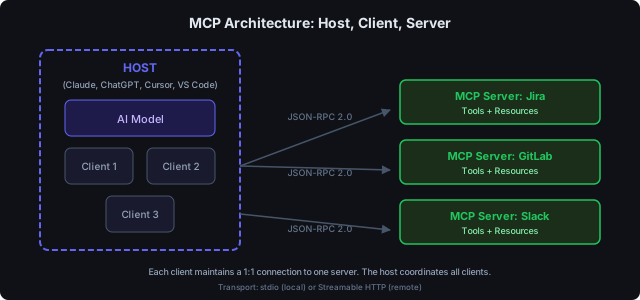
The architecture is three layers: a Host (the AI client your user interacts with), one or more Clients inside it (one per connected tool), and an MCP Server (the program exposing tools, resources, or prompts). Two transports: stdio for local processes, Streamable HTTP for remote and cloud deployments. Wire format is JSON-RPC 2.0. The full spec — capability negotiation, the three primitives (tools, resources, prompts), the lifecycle messages — is at modelcontextprotocol.io. We do not paraphrase it here. The rest of this post is the things the spec does not tell you: how adoption played out, where the security gaps are, and what changes when you actually deploy this in front of a team.
The adoption explosion
MCP went from a single company's open-source project to industry infrastructure in 13 months. Here is the timeline:
The numbers tell the story:
- 97 million monthly SDK downloads (Python + TypeScript combined) — source: Pento.ai
- 10,000+ active MCP servers in the ecosystem — source: Pento.ai
- 82,900+ GitHub stars on the reference server repository
- SDKs in 11 languages: Python, TypeScript, C#, Java, Kotlin, Go, PHP, Perl, Ruby, Rust, Swift — source: Wikipedia
- First-class support in Claude, ChatGPT, Cursor, Gemini, Microsoft Copilot, and VS Code — source: Pento.ai
For context: the Language Server Protocol — the closest comparable standard — took years to reach broad adoption. MCP reached ubiquity in under 14 months. The moment the standard stopped being Anthropic’s standard and became the standard was March 2025, when Sam Altman posted:
“people love MCP and we are excited to add support across our products.”
— Sam Altman, CEO OpenAI, March 2025
Who supports MCP
In December 2025, Anthropic donated MCP to the Agentic AI Foundation under the Linux Foundation. The founding members read like a who's-who of AI and enterprise technology:
Anthropic, OpenAI, Block, AWS, Google, Microsoft, Cloudflare, Bloomberg — source: Pento.ai
This is not one company's side project. It is a vendor-neutral standard governed by the same foundation that stewards Linux, Kubernetes, and Node.js.
Enterprise tool coverage
The ecosystem already covers the tools CTOs care about:
- Project management: Atlassian (Jira, Confluence), Azure DevOps, Linear
- Code and CI/CD: GitHub, GitLab, Docker, Kubernetes, cloud providers
- Communication: Slack, Microsoft Teams
- Business applications: Salesforce, HubSpot, Notion, Stripe
- Data and analytics: PostgreSQL, OpenSearch, Algolia
- Observability: Sentry, Grafana, LangSmith, Arize Phoenix
The official server repository maintains reference implementations, while the broader MCP Registry lists thousands more. And because MCP is an open protocol, anyone can build a server for any tool — no vendor approval required.
"Open technologies like the Model Context Protocol are the bridges that connect AI to real-world applications, ensuring innovation is accessible, transparent, and rooted in collaboration."
— Dhanji R. Prasanna, CTO at Block, Anthropic MCP announcement
The security question
MCP's rapid adoption has outpaced its security story. This is worth being direct about.
In April 2025, researchers documented several vulnerability classes in the MCP ecosystem:
- Prompt injection — Malicious data from a tool response can manipulate the AI's behavior.
- Tool spoofing — Lookalike tools that silently replace trusted ones.
- Data exfiltration — Tool permissions that allow an MCP server to access more data than intended.
These are real risks, not theoretical ones. The November 2025 spec update addressed several of them with async operations, server identity verification, and better permission models. But the ecosystem is still maturing.
For enterprise adoption, the question is not "is MCP secure?" but "how do I deploy MCP securely?" The answer is the same pattern enterprises already use for REST APIs: put a gateway in front of it.
Just as API gateways like Kong or Apigee sit between clients and backend APIs to enforce authentication, rate limiting, and audit logging — an MCP gateway sits between AI clients and MCP servers to provide:
- Per-user authentication — OAuth 2.0 per service, not shared API keys.
- Access control — Which users can invoke which tools, with what parameters.
- Audit logging — Every tool invocation recorded, traceable to a specific user.
- Policy enforcement — Block destructive actions, require confirmation for sensitive operations.
Raw MCP servers were not designed for enterprise. They are building blocks. The gateway pattern makes them enterprise-ready.
What this means for your company
If you are a CTO or VP Engineering evaluating AI strategy in 2026, here is the landscape:
The standard is settled. Every major AI provider supports MCP. The Linux Foundation governs it. You are not betting on a single vendor.
The ecosystem is real. With 10,000+ servers and SDKs in 11 languages, you are not building from scratch. If your team uses Jira, Slack, GitLab, or any major enterprise tool, there is likely an MCP server for it already.
The window is closing. Gartner estimates that 40% of enterprise applications will feature task-specific AI agents by end of 2026. Companies that build the integration layer now will have agents that can actually work across their tools. Companies that wait will be doing it under competitive pressure, with less time to get it right.
The practical path for most organizations:
- Start with one high-value workflow that crosses 3+ systems (e.g., Jira ticket to merged MR to Slack notification).
- Use a gateway rather than connecting MCP servers directly to AI clients. You need authentication, audit trails, and access control from day one — retrofitting security is always harder.
- Measure delivery, not output. Track cycle time from ticket to production, not lines of code generated.
- Expand gradually. Each new MCP server you connect extends what your AI agents can do — without rebuilding existing integrations.
See MCP in action
mcpgate is one way to deploy MCP for your team — a self-hosted gateway that connects AI agents to your work tools through a single MCP endpoint, with per-user OAuth, policy guardrails, and audit logging.
Try the live demo — no signup required. Or read the docs to evaluate whether the gateway pattern fits your architecture.
Further reading
Official MCP resources
- MCP Architecture Documentation — The official specification covering the client-server model, primitives, transports, and protocol lifecycle.
- MCP Reference Servers (GitHub) — Open-source reference implementations and links to the broader ecosystem registry.
- Anthropic MCP Announcement — The original November 2024 launch post with vision and launch partners.
Adoption and ecosystem
- "A Year of MCP" (Pento.ai) — Comprehensive 2025 review with adoption statistics, timeline, and enterprise use cases.
- Model Context Protocol (Wikipedia) — Neutral overview including adoption timeline, technical details, and security criticism.
Enterprise context
- AI tool integration is the competitive advantage nobody is talking about — Why tool integration, not model capability, is the real bottleneck for AI-powered engineering teams.
- How to connect Claude to Jira, Slack, and GitLab with one MCP endpoint — Technical setup guide for implementing MCP in your organization.